ModsCraft » Guides » Minecraft PE: Worlds and Add-ons Missing
Minecraft PE: Worlds and Add-ons Missing

WhatsApp
Telegram VKontakte Odnoklassniki Pinterest
Minecraft PE: Worlds and Add-ons Missing

After the Minecraft Pocket Edition 1.0.5 update, players noticed that their worlds, textures, and mods had disappeared and started to panic. But don't worry, it's very easy to fix.

Launch MCPE and go to the game settings.
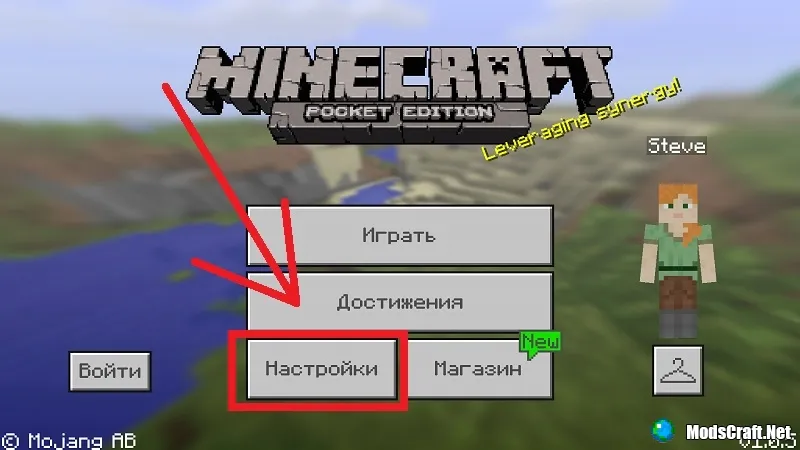
Minecraft PE: Worlds and Add-ons Missing

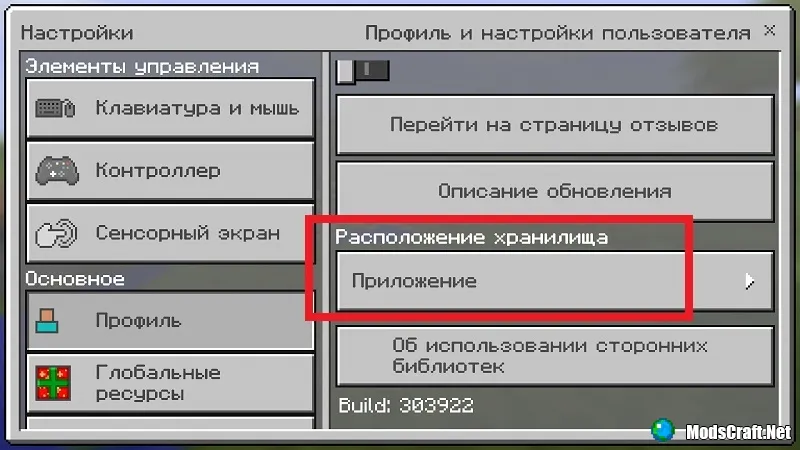
In settings, go to the "Profile" tab and expand the "Storage Location" list.
Set the value to "External".
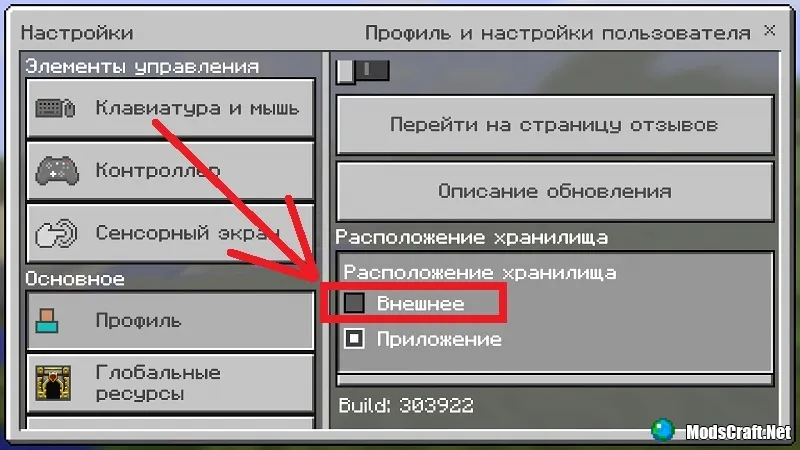
Now your worlds and add-ons will return to the game. Why the developers added this option in the first place is beyond us.

65 comments
  1. Guest avatar
    Михил Матвеенко
    14:41 7 Feb 18
    Помогло
  2. Guest avatar
    Grant
    19:26 10 Jan 18
    Огромное спасибо, помогло!)
  3. Guest avatar
    Вика
    11:40 20 Aug 17
    Не помогло!!!!
  4. Guest avatar
    Federal
    14:40 14 Aug 17
    После переключения между внешним и внутренним сохранениями, миры не переносятся на внешнее. Есть ли способ их через систему вскрыть, и перенести к себе?
    1. Avatar Admin
      Admin
      19:13 14 Aug 17
      Да, если у тебя есть Root-права :)
      1. Guest avatar
        Михаил Белей
        12:41 25 Sep 18
        а как
  5. Guest avatar
    Арсений
    21:57 27 Jun 17
    Не возвращает!!!!!!!!
  6. Guest avatar
    Артём Веретельников
    11:16 26 Jun 17
    не возвращает! поему?!

Immerse yourself in a unique adventure with classic survival, anarchy, a clan system, and constant events!…

PvP, Survival
IP:Port craft.pe:19132
Online 400 / 1501
Version 1.1 - 1.26
Play
