164 online
ModsCraft » Guides » How to install Minecraft maps?
How to install Minecraft maps?

WhatsApp
Telegram VKontakte Odnoklassniki Pinterest
How to install Minecraft maps?

If you have downloaded a map for Minecraft and don't know how to install it, then in this guide, we will explain the process of installing maps in different extensions.

Installing .mcworld extension:

  • Download the map file in .mcworld extension.
  • Open the file manager and go to the "Downloads" folder.
  • Tap on the map file to launch the game and start the installation.
  • Wait for the map to be imported and find it in the list of worlds!

Installing .mctemplate extension:

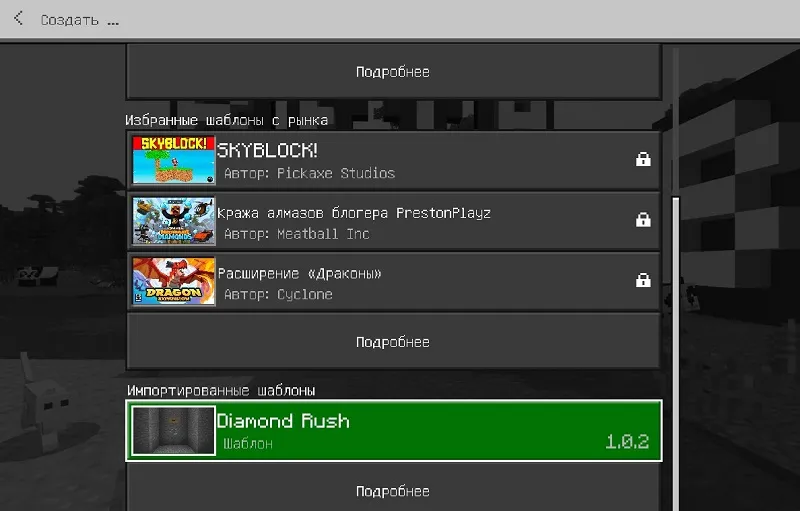
  • On any device, tap on the file to launch the game and start the world template installation process.

How to install Minecraft maps?

  • Proceed to create a new world and in the template window, find the imported world template. Tap on it to create a world with it.
Installing .zip extension:

  • For Android: In the game settings, set the storage to "External" and extract the map folder from the archive to /games/com.mojang/minecraftWorlds/.
  • For iOS: Rename the map file from .zip to .mcworld and tap on the file to start the map installation process.
  • For Windows 10/11: Extract the map folder to %LocalAppData%\\Packages\\Microsoft.MinecraftUWP_8wekyb3d8bbwe\\LocalState\\games\\com.mojang\\minecraftWorlds.

If you have any difficulties or questions, feel free to leave a comment, and we will be happy to help!

  1. Guest avatar
    Alex Savishin
    21:33 2 Jan 23
    а Я скачал майн
  2. Guest avatar
    Тимофей
    23:06 29 Dec 22
    Что делать если пишет сбой импорта мира
  3. Guest avatar
    Фраклин
    19:03 22 Dec 22
    Москва
  4. Guest avatar
    KurahMaax
    17:48 12 Dec 22
    Здравствуйте! Как можно отправить карту в телеграмм.. У меня Android. Я пытался и переименовывать папку и в .zip и в .mcworld Пользовался сторонними приложениями! Потом пытался сделать .zip и потом этот же файл переименовать в .mcworld Все безуспешно( Может вы подскажете?
    1. Guest avatar
      Ксения
      9:43 11 Mar 23
      В списке загрузок нажми на три точки справа и там будет - поделится , а потом выбираешь телеграм
  5. Guest avatar
    Егор
    13:23 10 Dec 22
    У меня нет папки Моджанг, что делать?
    1. Guest avatar
      Витя
      19:38 10 Jul 23
      Майкрософт надо заделать понял?
  6. Guest avatar
    Кто-то
    4:20 7 Dec 22
    Не смогло распоковать. Файловый менеджер (при этом все, даже встроенный) пишут, что ошибка распоковки
  7. Guest avatar
    Гыг
    15:17 27 Aug 22
    У меня постоянно пишет збой импорта мира ЧТО ДЕЛАТЬ!? нечего на помогает.
  8. Guest avatar
    LozzosGaw
    20:52 18 Aug 22
    что делать если Майнкрафт запускается и тут же вылетает при нажатии на файл .mcworld?
  9. Guest avatar
    Бешеный хлеб
    10:07 24 Jun 22
    Чоделать есле пишет сбой импорта мира?
  10. Guest avatar
    Кіра
    15:19 5 Jun 22
    А есть такая постройка где много карты

ModsCraft

223

Immerse yourself in a unique adventure with classic survival, anarchy, a clan system, and constant events!…

136 / 1501 online Version 1.1 - 1.26
IP copies: this month · today
Server overview →
