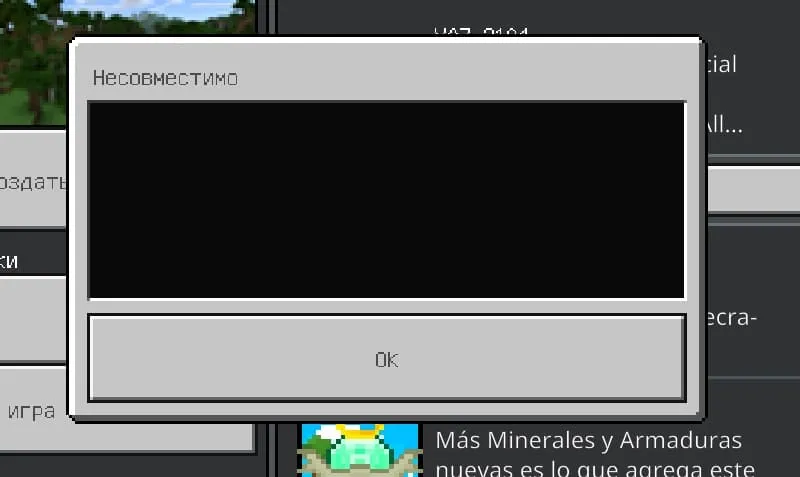
Getting 'Incompatible' Error When Installing a Mod?

Lately, we've been noticing that users are complaining in the comments about an 'Incompatible' error when trying to activate a mod (add-on) in Minecraft. We decided to write this small guide to help you.
First, we want to note that some mods are not updated by their developers, so in case of an error, you'll have to do these steps manually, since we cannot manually update absolutely all files, though we will try to do so.
Before You Start
If the mod is not yet installed or has been deleted, you can open the file with an archiver.
If the mod is already installed, you need to go to the folder:
- Windows 10: C:\Users\Username\AppData\Local\Packages\Microsoft.MinecraftUWP_8wekyb3d8bbwe\LocalState\games\com.mojang\behavior_packs\Mod_Folder\
- Android: \games\com.mojang\behavior_packs\Mod_Folder\
Open the manifest.json file with a text editor.

Now you need to make a few changes to this file:
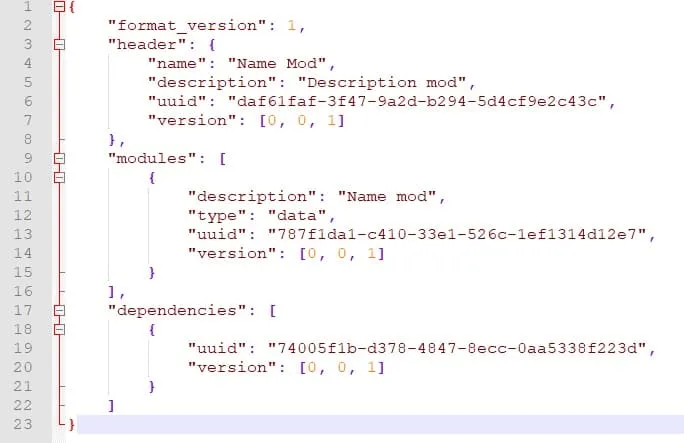
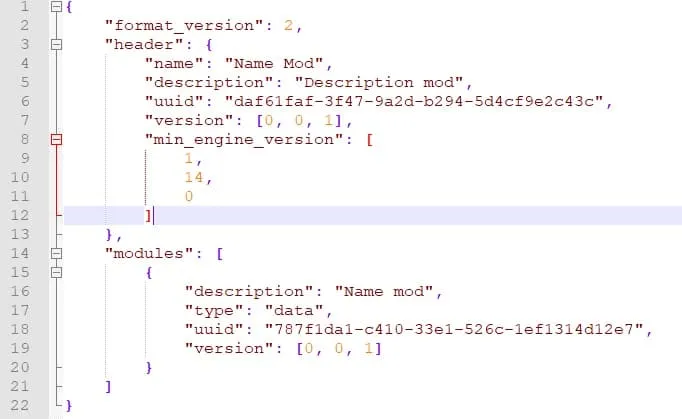
- In the format_version line, replace the value 1 with 2
- After version, add the following code (if the quotes automatically changed to curly quotes, replace them):
- "min_engine_version": [
1,
14,
0
]
- "min_engine_version": [
- Just in case, delete the dependencies block if it exists
Example file before changes:
Example file after changes:
Do the same for the resource pack if one comes with the mod.
If you do everything correctly, after restarting the game (if it was running), the mod can be activated and you can play with it.
Note
Very often players forget that for many mods to work properly, you need to enable experimental features. But what are they for?
- Holiday Creator Features: enable if the mod has crafting recipes
- Custom Biomes: enable if the mod adds biomes
- Additional Modding Capabilities: enable if the mod uses the /function command
- Upcoming Creative Features: enable if the mod uses custom fog or changes entity properties
- Enable GameTest Framework: enable if the mod uses GameTest Framework features
- Experimental Molang Features: enable if the mod uses Molang capabilities
We hope this tutorial was helpful! If you have any questions, leave a comment and we'll definitely help you.
