Skin Diamond Man
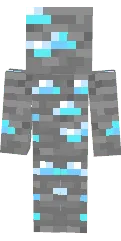
The Diamond Man skin for Minecraft PE features a character made entirely of diamonds. Shimmering armor and a slight glow make him look like a living statue of precious stone.
This skin suits players who want to show off wealth and power. It perfectly matches diamond weapons and tools, creating a cohesive elite warrior look.
You can also find the skin installation guide on our website if you need help.
Download skin Diamond Man
There are no comments, be the first!
Leave a comment, share your impression or ask a question.