Minecraft on Android: How to Choose Based on Your Processor?
An APK file is an installation file for a game or app. We are often asked how to choose the right installation file for your device, so we wrote this article.
Apps for Android are typically released for the following CPU architectures:
- armeabi-v7a
- arm64-v8a
- x86
These are the three main architectures now.
How to choose the right one?
The easiest way is to launch Telegram. Just open its settings and scroll all the way down.

Another option is to install a third-party app that displays various information about your device. One such app is CPU-Z (free on Google Play).
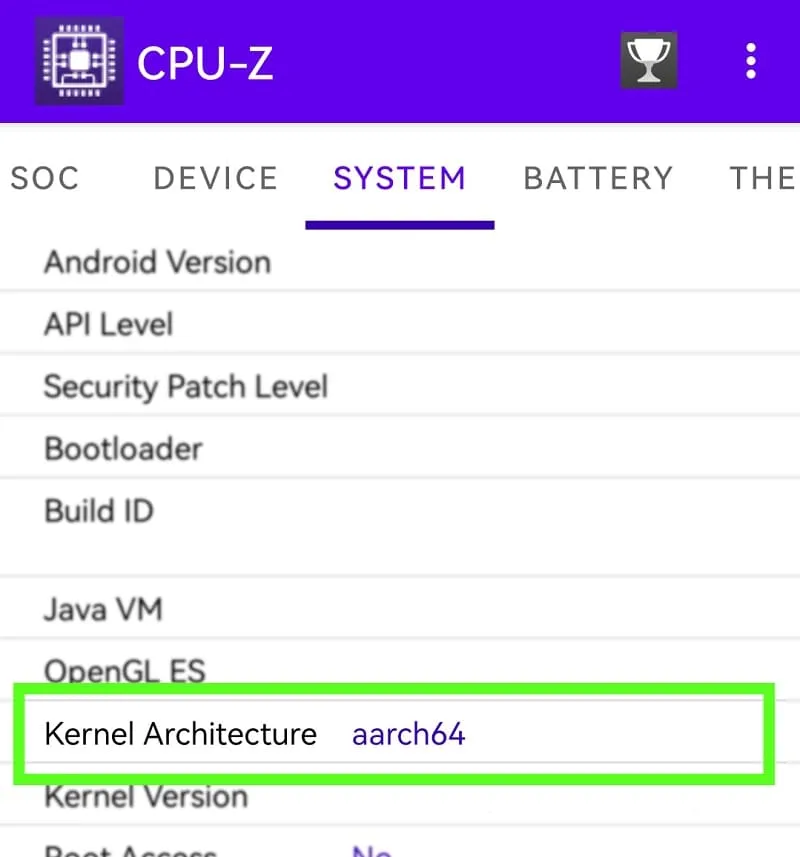
In the screenshot we see aarch64, which is arm64-v8a.
Important to know:
- arm64-v8a allows installing both arm64-v8a and armeabi-v7a apps
- If the CPU only supports armeabi-v7a, you can only install apps for armeabi-v7a
- If the CPU is x86, you can only install apps for x86
11
comments
Comments in a new tab
