Skin Minion Flash
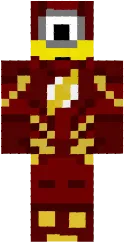
The Minion Flash skin turns your character into a funny minion from the Despicable Me movie. The yellow body, blue overalls, and big goggles make the look recognizable and fun.
This skin is suitable for players who love bright and unusual appearances. It looks great in multiplayer and makes you stand out among other players.
You can also find the skin installation guide on our website if you need help.
Download skin Minion Flash
There are no comments, be the first!
Leave a comment, share your impression or ask a question.