Skin Barry Alen
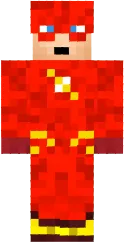
Skin Barry Alen for Minecraft PE turns your character into the fastest superhero Flash. The bright red suit with golden lightning bolts and a chest emblem will definitely attract attention. This skin is perfect for comic book fans and superhero themes.
The skin is detailed and looks good in motion. It is suitable for speed runs on maps or for superhero role-playing games. Skin Barry Alen will add dynamics to your gameplay.
You can also find the skin installation guide on our website if you need help.
Download skin Barry Alen
There are no comments, be the first!
Leave a comment, share your impression or ask a question.