Skin Dirol
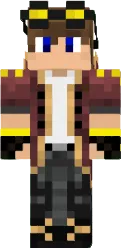
The Dirol skin stands out with bright colors and an unusual design. The character wears a colorful jacket with geometric patterns, jeans, and sneakers. On the head is a cap with a logo. This look resembles a street artist or skateboarder, giving the game a modern and dynamic feel.
The skin is highly detailed: stitches on clothes, pockets, even shoelaces are visible. Colors are contrasting red, blue, yellow. Suitable for players who want to look unconventional and stand out. Looks great in urban locations and on multiplayer servers.
You can also find the skin installation guide on our website if you need help.
Download skin Dirol
There are no comments, be the first!
Leave a comment, share your impression or ask a question.