Skin Lenin
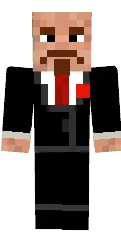
The Lenin skin for Minecraft PE conveys the image of the famous revolutionary. Bald head, beard and strict suit with tie are typical of historical depictions.
This skin is suitable for those interested in history or who want to stand out on the server. It will give your character an intelligent and strict look.
You can also find the skin installation guide on our website if you need help.
Download skin Lenin
There are no comments, be the first!
Leave a comment, share your impression or ask a question.