Skin Neon Creeper
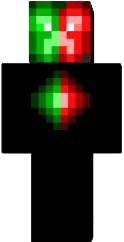
The Neon Creeper skin turns a regular creeper into a neon glow. Bright green and black tones create a backlight effect, making the character visible even in the dark. Suitable for players who want to stand out and add style to the game.
This skin is inspired by cyberpunk aesthetics and looks great on city-themed maps. You will look like a dangerous mob but remain a player. An excellent choice for PvP and minigames.
You can also find the skin installation guide on our website if you need help.
Download skin Neon Creeper
1 comment
Comments in a new tab