Skin Miner
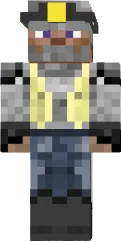
The Miner skin features a classic miner in a blue jumpsuit, yellow helmet, and holding a pickaxe. This look is perfect for those who spend a lot of time in mines and caves.
The skin details are well crafted: the jumpsuit has tool pockets, and the helmet protects the head. The skin suits both survival and mini games where a hardworking character is needed.
You can also find the skin installation guide on our website if you need help.
Download skin Miner
There are no comments, be the first!
Leave a comment, share your impression or ask a question.