ModsCraft » Guides » How to publish on ModsCraft?
How to publish on ModsCraft?

WhatsApp
Telegram VKontakte Odnoklassniki Pinterest
How to publish on ModsCraft?

People often write to us with a question about how to publish their add-on on the site. This post will help you publish on ModsCraft!

If you want to send your addon, map or texture, write to our email admin@modscraft.net.

Letter format:

  • The name of the addon, map or texture
  • Description (if it's something big, try to describe it in detail)
  • The version of Minecraft that the add-on is created for
  • Screenshots if possible
  • Attach the file or download link

If you wish, you can write the author or authors, as well as social networks, so that we add this information to the page.

Below is an example of such a letter.
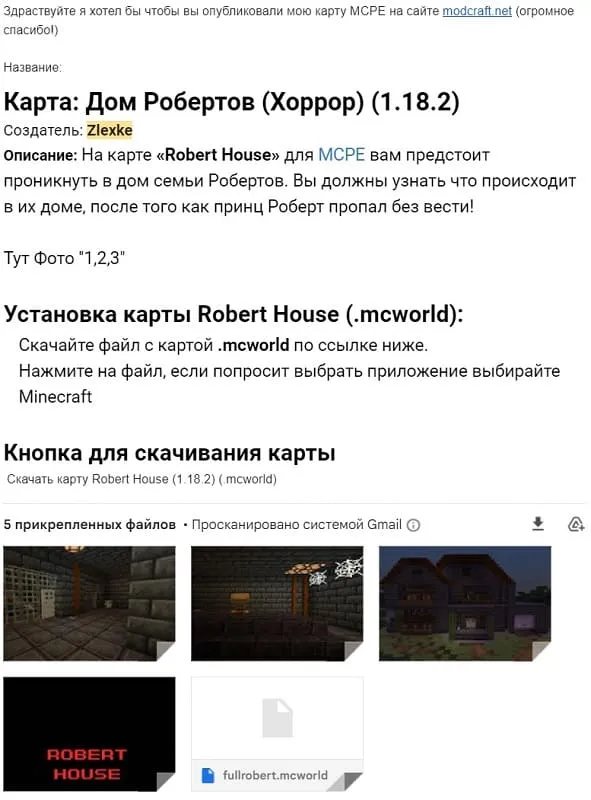
Example of a letter
97 comments
  1. Guest avatar
    6Leysey63
    2:52 4 Jul 23
    Как выложить мой мод?
    1. Guest avatar
      Тиф
      13:06 22 Jul 24
      Не знаю
  2. Guest avatar
    DANTiFu
    23:13 30 Mar 23
    Очень полезно скоро выложу свою карту чуть-чуть осталось это большая карта по scp лаборотории зоны 19
    1. Guest avatar
      DANTiFu
      23:15 30 Mar 23
      :) ждите
  3. Guest avatar
    Wender
    12:51 1 Oct 22
    Спасибо за гайд. Давненько хотел карту отправить.

The best Minecraft server! Accessible on all versions!

IP:Port gamepe.me:19132
Online
Version 1.1.5 - 1.26
Play
