Minecraft PE: Complete Guide to Horses

In the new version of Minecraft Pocket Edition 0.15.0, as many know, horses, donkeys, and mules were added, which you can tame to ride! This is very useful for traveling in the game world. And since many don't know how to tame a horse and ride it, we decided to make this little guide =)
Taming a Horse
First, you need to find a horse. This shouldn't be hard, as they can be found in the Plains and Savanna biomes. Then approach it and mount it, but note that you won't tame it on the first try, so we recommend feeding it apples or wheat first, then try mounting it again to tame it. This may take several attempts.
If you succeed, heart particles will appear around it, and it won't try to throw you off anymore.

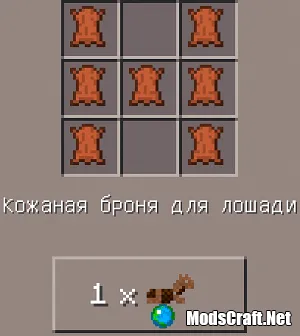
You can also put armor on a tamed horse: leather, iron, gold, or diamond. You can only craft leather armor at a crafting table; the other types can be found in treasure chests and such.
To put on armor, open the horse's interface (long-press on it or press the "open" button). In the interface, just below the saddle slot, you should see a slot for armor.

Now simply tap on the armor item and it will automatically go into the correct slot, and the armor will appear on the horse.

You can also attach a chest to a mule or donkey by long-pressing on it with a chest in your hand.

Remember, once attached, you cannot remove the chest, and it has almost half the inventory space of a small chest, but it's still very useful.
To open its interface, simply mount the horse and press the "open" button. The horse's interface will open, showing a chest icon. You can put all sorts of "junk" in there.

Riding a Horse
A horse's stats (speed, jump height, and health) do not depend on its color, but on its lineage. Horses and donkeys can jump over fences.
To ride a horse, simply mount it and control it like a normal character using the control buttons.

You can even jump while riding by holding down the jump button. The horse can jump over two blocks high, which is very useful!

To dismount, simply double-tap the sneak button on the right side of the screen.
Dyeing Horse Armor
To dye horse armor, you need leather horse armor (crafted as above). Get a cauldron and place it anywhere, then tap it with a water bucket.

Now tap the cauldron with water with any dye (you can also mix colors), and the water in the cauldron will change color.

Then just tap the horse armor, and it will immediately dye to the desired color.

To put on the armor, open the horse's interface and place the item in the special slot by tapping on it.

Your horse will immediately get a new look and become even more beautiful =)