Skin Nature Elf
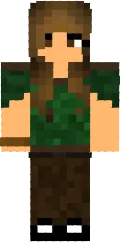
The Nature Elf skin turns your character into a graceful forest elf. The design uses green and brown tones, with long ears and natural elements on the clothes.
This skin is suitable for players who love fantasy worlds and want to add magic to their game. You will stand out among other players on roleplay servers.
You can also find the skin installation guide on our website if you need help.
Download skin Nature Elf
There are no comments, be the first!
Leave a comment, share your impression or ask a question.