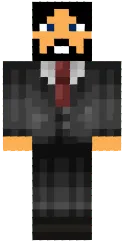
Skin Security guard

The Security Guard skin for Minecraft PE depicts a security officer in uniform: dark suit, cap and patches. The character looks vigilant and ready to maintain order.
This skin is suitable for roleplays that require object protection, as well as for city or military base themed servers. It adds realism and helps create an atmosphere of security.
You can also find the skin installation guide on our website if you need help.
Download skin Security guard
1 comment
Comments in a new tab