Skin Mario Girl
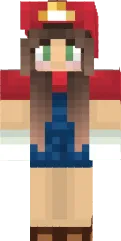
The Mario Girl skin turns your character into a charming girl from the Mario universe. Red dress, white apron, and the famous cap with the letter M make the look recognizable and playful. This skin adds color to your game and lifts your mood.
It is perfect for Nintendo fans and those who want to bring a touch of nostalgia to Minecraft PE. The skin looks great on themed servers or in friendly builds. The bright colors and detailed textures attract attention.
You can also find the skin installation guide on our website if you need help.
Download skin Mario Girl
There are no comments, be the first!
Leave a comment, share your impression or ask a question.