Skin Pirate King
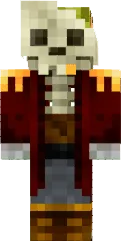
Pirate King skin turns your character into a true pirate king. A luxurious hat with a feather, a doublet, and boots emphasize the status of the sea lord. The look is completed with details that make it recognizable and striking.
This skin is suitable for themed builds, pirate servers, or just for those who want to feel like a captain. Pirate King adds charisma to any adventure in Minecraft PE.
You can also find the skin installation guide on our website if you need help.
Download skin Pirate King
2 comments
Comments in a new tab